
Warehouse Automation Tips for Ecommerce Sellers Using PDF Tools
Introduction
In 2026, the rapid growth of ecommerce operations has placed immense pressure on sellers to deliver faster than ever before. With platforms like Amazon and Flipkart constantly raising the bar for dispatch SLAs, sellers are finding that manual warehouse operations are a massive bottleneck.
Manual tasks—such as snipping shipping labels one by one, sorting through stacks of unorganized invoices, and manually inputting tracking data—lead to dispatch delays, human errors, and significant labor costs. To scale your ecommerce business, automation is no longer a luxury; it is a vital necessity.
In this guide, we will explore practical warehouse automation tips specifically focused on optimizing how you handle your core logistics documents. By leveraging the right PDF tools, you can drastically reduce manual work, improve team productivity, and accelerate order fulfillment.
What Is Warehouse Automation?
Warehouse automation involves replacing repetitive, manual tasks with software or machinery to streamline operations. While massive fulfillment centers use robots and conveyor belts, small to medium ecommerce sellers achieve high-impact automation by simply digitizing and automating their document workflows.
A manual workflow relies on staff to individually format shipping labels, sort papers, and cross-reference data. An automated workflow uses software to bulk process shipping PDFs, extract tracking data, and format printing layouts instantly. Even a small seller processing 50 orders a day can save hours by automating their logistics documentation.
Common Warehouse Challenges for Ecommerce Sellers
High Order Volumes
Sudden spikes during sale seasons overwhelm manual packing teams.
Shipping Label Management
Marketplaces provide labels in A4 format, but thermal printers require 4x6 dimensions, necessitating tedious manual cropping.
Invoice Processing
Separating tax invoices from shipping labels causes massive paper waste and organizational nightmares.
Inventory Documentation
Losing track of supplier manifests and physical counting sheets leads to stock discrepancies.
Manual Data Entry
Typing AWB numbers manually from printed sheets into a spreadsheet invites typos and tracking errors.
Dispatch Delays
When documents are not printed and matched to boxes quickly, couriers refuse to wait, leading to missed SLA deadlines.
How PDF Documents Impact Warehouse Operations
The ecommerce warehouse runs entirely on PDFs. Managing these files efficiently is the foundation of a streamlined operation:
- Shipping Labels: Scannable barcodes linking the physical package to the digital order.
- AWB Documents: Courier tracking manifests used for dispatch handover.
- Invoices: Essential tax documents often bundled with labels.
- Packing Slips: Internal checklists to ensure the right items go into the right box.
- Return Documents: RTO manifests required to reconcile failed deliveries.
- Inventory Reports: Master stock lists exported from your ERP.
Top Warehouse Automation Tips Using PDF Tools
1. Automate Shipping Label Processing
Stop using the snipping tool. Implement a Label Cropper Tool to automate the extraction of 4x6 thermal labels from A4 marketplace sheets. Whether you are dealing with Amazon, Flipkart, Meesho, or Snapdeal workflows, an automated cropper guarantees barcode visibility and allows for instantaneous bulk printing.
2. Use PDF Splitters for Order Documents
When you download 500 orders, you receive a massive PDF. Use a PDF Splitter to separate this giant file into manageable 50-page batches. This allows multiple packing stations to process orders simultaneously without causing printing bottlenecks.
3. Merge Related Shipping Documents
If your ERP outputs labels and invoices separately, use a PDF Merger to combine them before printing. Having the invoice print sequentially right after the label ensures that dispatch paperwork is never disorganized, reducing packaging confusion.
4. Automate Invoice Management
Bulk invoice storage is critical for tax compliance. Instead of printing them to a filing cabinet, automate your workflow by saving digital, searchable PDFs into designated cloud folders. Utilize PDF metadata tools to tag files by date and marketplace for easy retrieval.
5. Implement OCR for Warehouse Records
Many suppliers provide physical manifests or scanned image PDFs. By running these through an OCR PDF Tool, you convert static images into searchable text. This allows your team to easily extract text, search for specific SKUs, and digitize inventory records efficiently.
6. Organize AWB Documents Efficiently
AWB tracking manifests are your proof of handover to the courier. Process these documents in bulk daily, ensuring they are cleanly cropped, printed clearly, and digitally archived. Better AWB management directly improves courier coordination and tracking accuracy.
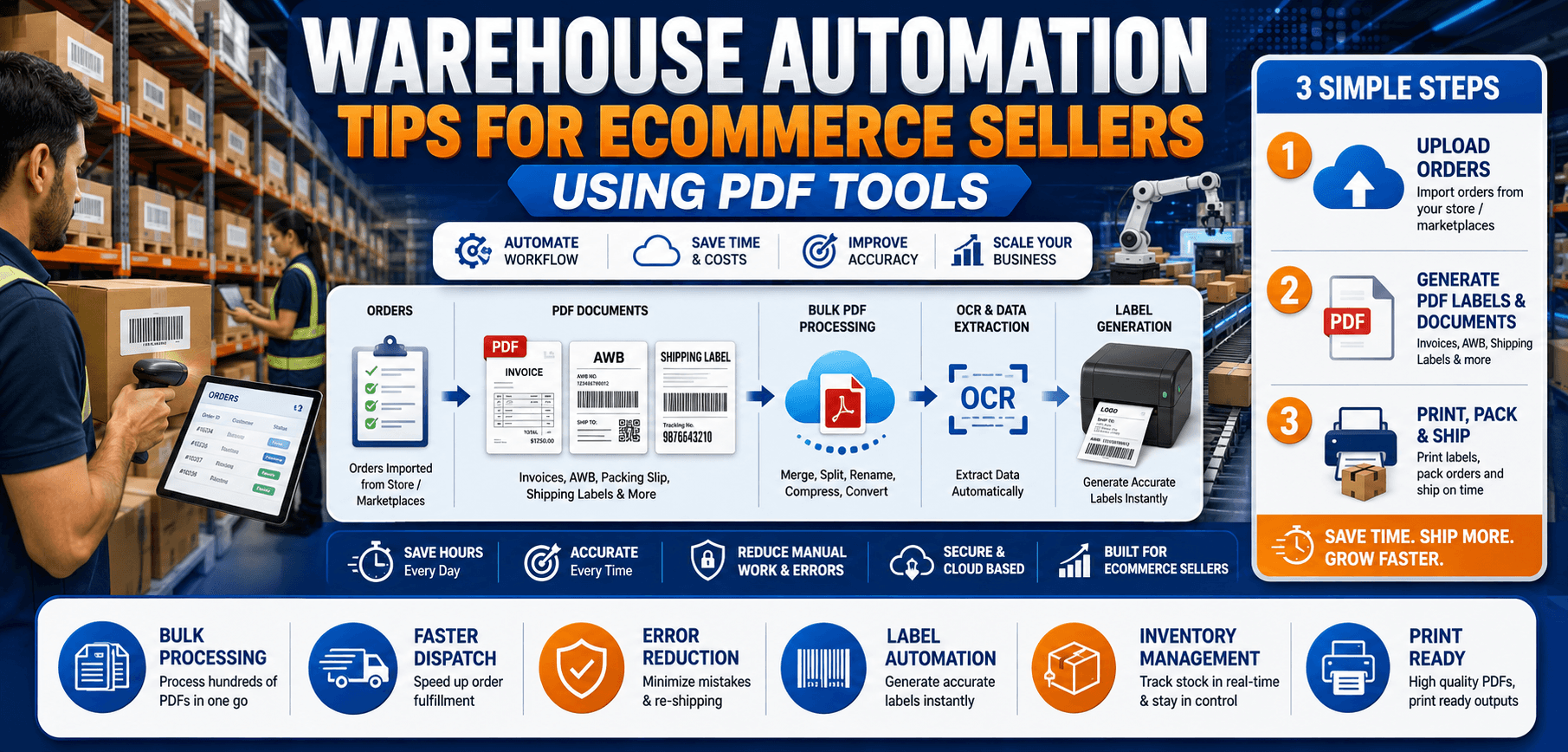
Warehouse Automation Workflow Example
Here is how a modernized ecommerce warehouse handles daily fulfillment:
- Download orders: Bulk download all pending orders from seller panels.
- Generate shipping labels: Receive a single massive PDF of A4 sheets.
- Crop labels automatically: Run the file through an automated Label Cropper to extract 4x6 thermal labels in seconds.
- Split and organize documents: Split the resulting file into batches for different packing stations.
- Print labels in bulk: Send directly to high-speed thermal printers.
- Package orders: Staff simply stick labels and pack boxes rapidly.
- Dispatch shipments: Scan packages seamlessly into the courier's system.
- Archive records automatically: Store digital PDFs in secure cloud storage for compliance.
Manual Warehouse Workflow vs Automated Workflow
| Feature | Manual Process | Automated Process |
|---|---|---|
| Order Processing Speed | Slow (hours per batch) | Instant (seconds per batch) |
| Label Management | Manual cropping / Scissors | Software-driven bulk cropping |
| Human Errors | High (cut off barcodes) | Zero (precise software detection) |
| Labor Requirements | High (dedicated computer staff) | Minimal (staff focuses on packing) |
| Scalability | Breaks during sale events | Handles unlimited volume easily |
Benefits of Using PDF Tools in Warehouse Operations
- Faster Dispatch: Eliminate formatting bottlenecks so packages hit the loading dock earlier.
- Improved Accuracy: Perfect barcode borders ensure a 100% first-time scan rate by the courier.
- Reduced Costs: Use less paper and ink by formatting directly for thermal printers.
- Better Team Productivity: Warehouse staff spend time packing, not wrestling with Adobe Acrobat.
- Easier Compliance: Digital invoices and OCR-searchable documents simplify tax audits.
- Enhanced Customer Satisfaction: Faster dispatch leads directly to positive seller reviews.
Warehouse Automation for Different Marketplaces
Amazon Sellers
Automation tools seamlessly clear out standard Amazon invoice pages and crop the ATSPL labels for high-speed Easy Ship workflows.
Flipkart Sellers
Label croppers target Ekart routing codes, completely stripping out the attached billing information.
Meesho Sellers
Automation effortlessly handles dense Meesho PDF files, separating the top-half shipping layout from the bottom-half tax details.
Snapdeal Sellers
Bulk PDF processors perfectly trim borders to ensure Snapdeal barcodes scan flawlessly on the first attempt.
Common Automation Mistakes to Avoid
- Incorrect printer settings: Forgetting to turn off "Scale to Fit" ruins even perfectly cropped labels.
- Poor document organization: Downloading batches without naming them leads to shipping the wrong items to the wrong customer.
- Manual processing bottlenecks: Having one employee manually crop labels on a single laptop before packing can begin.
- Ignoring barcode quality: Assuming any crop is fine, resulting in cut-off routing zones.
Future of Ecommerce Warehouse Automation in 2026
By 2026, the standard for warehouse operations relies heavily on AI-powered workflows. We are seeing a major shift towards automated barcode verification before printing and fully digital inventory systems that instantly sync across all marketplaces. Smart shipping document processing ensures that manual intervention is virtually eliminated, pushing small businesses to adopt intelligent fulfillment automation to remain competitive.
Frequently Asked Questions (FAQs)
1. What is warehouse automation?
It is the use of software and specialized tools to replace repetitive manual labor in fulfilling orders, specifically concerning document handling and packing workflows.
2. Can PDF tools improve warehouse productivity?
Absolutely. Automating the formatting, cropping, and merging of shipping PDFs can cut daily operational time in half.
3. How do shipping labels affect fulfillment speed?
If a label is printed poorly or cropped incorrectly, the courier scanner rejects it, causing immediate dispatch delays and repackaging requirements.
4. What is OCR and how does it help warehouses?
Optical Character Recognition (OCR) converts scanned image documents (like physical manifests) into searchable text, making inventory archiving vastly easier.
5. Can I automate label cropping?
Yes. Using a tool like AllPDFTools Label Cropper automatically detects shipping borders and outputs thermal-ready PDFs instantly.
6. Which PDF tools are most useful for ecommerce sellers?
Label Croppers, PDF Splitters (for batch organization), PDF Mergers (for combining manifests), and OCR extractors.
7. How can small sellers automate warehouse operations?
Start by investing in a thermal printer and a reliable browser-based PDF automation suite. Shift away from A4 paper printing and manual scissor cutting.
8. What is the best warehouse document management strategy?
Process documents in daily batches, separate labels from tax invoices digitally before printing, and utilize cloud storage for long-term document archiving.
Conclusion
Warehouse automation is no longer restricted to corporate giants with million-dollar conveyor belts. For modern ecommerce sellers, automation begins with digital documents. By adopting smarter workflows for handling shipping labels, invoices, and manifests, you radically increase your fulfillment speed and accuracy.
Relying on manual PDF formatting is a hidden cost that steals hours of productive warehouse labor every day. Empower your team with the right tools, and watch your dispatch speed skyrocket.
Automate Your Warehouse PDF Workflows Today
Stop wasting warehouse labor on manual cropping and sorting. Streamline your ecommerce operations with AllPDFTools' free, browser-based automation tools.