
Complete Guide to Meesho Shipping Labels, Invoices and AWB Documents
Introduction
Selling on Meesho has seen explosive growth over the last few years. With millions of customers flocking to the platform for affordable products, it presents a massive opportunity for eCommerce businesses and dropshippers. However, scaling your business comes with operational challenges—the biggest being proper shipping documentation.
There is a common confusion among new sellers regarding the various documents generated during order fulfillment: shipping labels, invoices, and AWB (Air Waybill) documents. Knowing what each document does, how to print it correctly, and where it fits in the logistics chain is absolutely essential.
In this complete guide, we will break down everything you need to know about Meesho shipping documentation, from identifying components on a label to automating your daily printing workflow.
Understanding Meesho Order Fulfillment
Before diving into the specific documents, it helps to understand exactly how the fulfillment process works on Meesho.
Order Received
When a customer places an order, it appears in your Meesho Seller Panel under the "Pending" tab.
Order Confirmation
You accept the order. At this point, Meesho generates the crucial shipping documents: the invoice and the shipping label (which contains the AWB number).
Packing Process
Your warehouse team packs the product. The invoice is typically placed inside the package for the customer's reference.
Shipping Preparation
The shipping label is printed and pasted securely on the outside of the polybag or box. This label tells the courier where to go.
Courier Pickup
A logistics partner (like Delhivery, Ecom Express, or Shadowfax) arrives. They scan the barcode on the shipping label to update the order status to "Shipped."
Delivery Tracking
Both you and the customer track the package using the AWB number until it reaches its final destination.
What Is a Meesho Shipping Label?
A shipping label is a mandatory identification document pasted on the exterior of a package. Its primary purpose is to provide the courier company with all the necessary routing information to deliver the package from your warehouse to the customer's doorstep.
A label must be highly scannable. Without a clear barcode, sorting facilities cannot process the package, leading to delays and Return to Origin (RTO) cases.
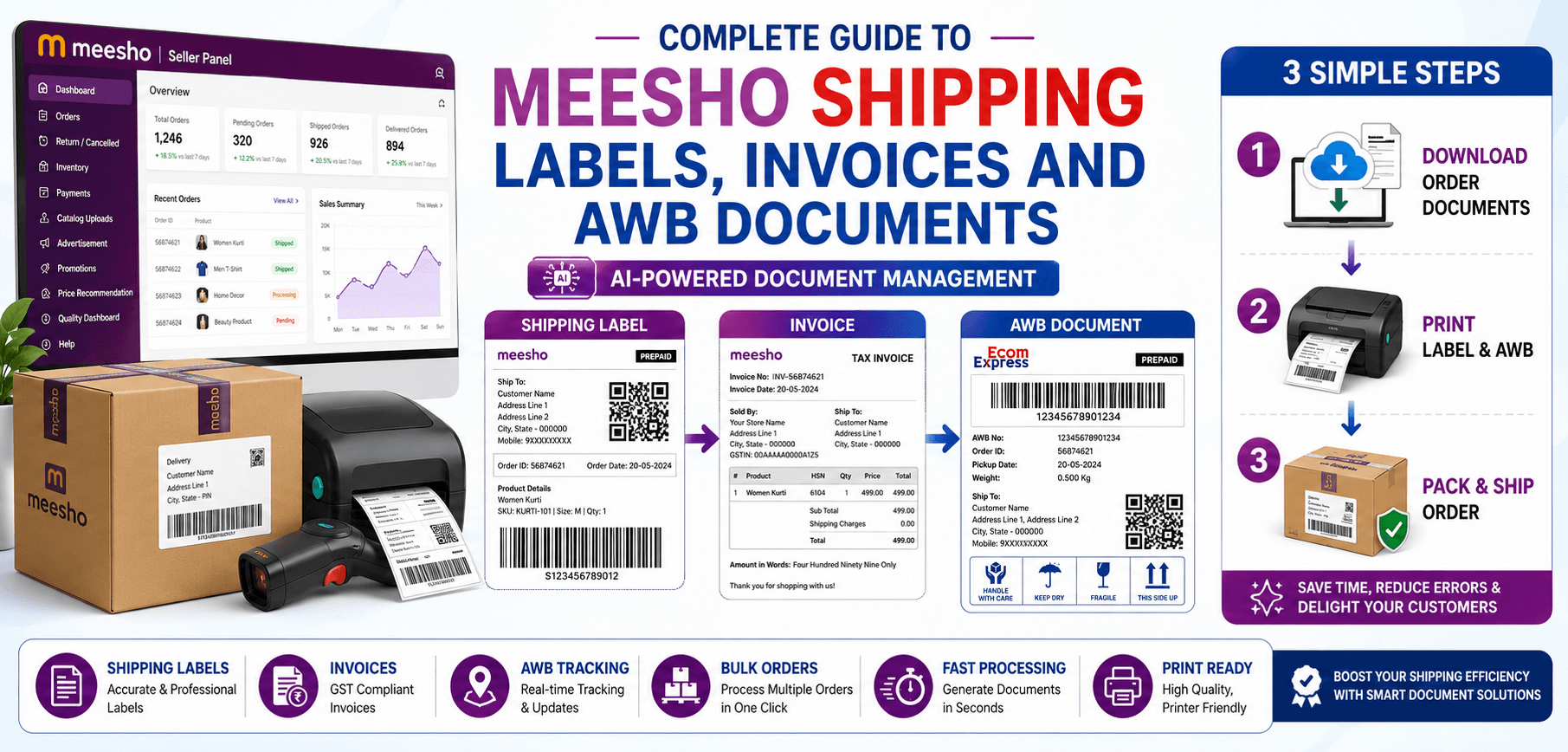
Components of a Meesho Shipping Label
If you look closely at a Meesho shipping label, you will see several distinct sections:
Order ID
A unique alphanumeric identifier assigned by Meesho to track the transaction internally.
Tracking Number (AWB)
The specific tracking code used by the courier company.
Customer Address
The delivery destination, including the PIN code and phone number (sometimes masked for privacy).
Seller Information
Your warehouse or return address. If the delivery fails, the package is sent back here.
Barcode
A machine-readable representation of the AWB number. This is scanned at every transit hub.
Courier Information
The logo and routing codes of the assigned logistics partner.
What Is a Meesho Invoice?
While the shipping label is for the courier, the invoice is for the customer and your accounting team. It is a commercial document that itemizes the transaction, serving as proof of purchase and a tax compliance document.
Meesho automatically generates this document in a standard format, ensuring that it meets GST requirements and provides the buyer with order verification.
Information Included in a Meesho Invoice
- Product Details: Name and SKU of the item sold.
- Quantity: Number of units purchased.
- Selling Price: The final price paid by the customer.
- Taxes: CGST, SGST, or IGST breakdowns for compliance.
- Buyer Information: Customer name and billing address.
- Seller Information: Your registered business name and GSTIN.
- Invoice Number: A sequential, unique document number for accounting.
What Is an AWB (Air Waybill) Document?
AWB stands for Air Waybill. Originally used in air freight, the term is now broadly used in eCommerce to refer to the unique tracking number assigned to any shipment by a logistics provider.
In the Meesho ecosystem, you don't typically download a standalone "AWB Document." Instead, the AWB number and its corresponding barcode are integrated directly into the Meesho shipping label. It is the primary key used to track the shipment's journey from pickup to delivery.
AWB vs Shipping Label vs Invoice
| Feature | Shipping Label | Invoice | AWB |
|---|---|---|---|
| Main Purpose | Package routing | Proof of purchase & Tax | Shipment Tracking ID |
| Contains Pricing | No (usually just COD amount) | Yes (Detailed breakdown) | No |
| Contains Tracking Details | Yes (Includes the AWB) | Sometimes referenced | Yes (It IS the tracking ID) |
| Used by Courier | Yes (Crucial) | No | Yes |
| Used by Customer | No | Yes (Inside the box) | Yes (For tracking status) |
How to Download Meesho Shipping Documents
Follow these simple steps to retrieve your documents:
- Step 1: Login to Seller Panel. Access your Meesho supplier dashboard.
- Step 2: Open Orders Section. Navigate to the "Orders" tab.
- Step 3: Select Ready-to-Ship Orders. Move orders from Pending to Ready to Ship by accepting them.
- Step 4: Download Shipping Label. Select the orders and click the download labels button. This generates a PDF.
- Step 5: Download Invoice. Invoices are usually generated alongside the labels in the same PDF document.
- Step 6: Download AWB Document. You don't need a separate document; the AWB is printed directly on the shipping label.
How to Print Meesho Labels Correctly
Printing labels correctly is vital. A bad print job means the courier cannot scan the barcode, leading to refused pickups.
- Printer Settings: Always print in high contrast or pure black and white.
- Paper Size: Thermal labels usually require 4x6 inch paper. If using standard A4, you can print 4 labels per page.
- Barcode Visibility: Ensure the barcode is completely flat and free from smudges.
- Thermal Printer Compatibility: If you use a thermal printer, you will need to crop the A4 PDF provided by Meesho to fit the 4x6 dimensions.
Common Printing Mistakes Sellers Make
Cropped Labels
Manually taking screenshots to crop labels often cuts off vital courier routing codes.
Blurry Barcodes
Printing low-resolution images causes the barcode lines to bleed together.
Incorrect Scaling
Shrinking an A4 page to fit a 4x6 label without proper cropping makes the text unreadable.
Missing Sections
Failing to include the return address means undelivered packages will be lost forever.
Low-Quality Printing
Using a printer running out of ink results in faded, unscannable documents.
How Automatic Label Cropping Helps Meesho Sellers
Because Meesho provides the shipping label and the invoice on a single A4 PDF page, printing on compact thermal printers is difficult. Sellers must separate them.
Automatic label cropping solves this. By using a tool like AllPDFTools, you can upload your bulk order PDFs. The software instantly detects the label area, removes the invoice section, and outputs perfectly sized 4x6 labels. This enables massive bulk label processing, vastly faster printing, and zero manual editing errors.
Best Practices for Managing Shipping Documents
- Verify customer details: Quickly scan for obvious formatting errors in addresses.
- Check barcode readability: Do a test scan with your smartphone if a print looks faded.
- Keep invoice copies: Maintain digital archives of all invoices for tax season.
- Organize AWB records: Export order data to track which AWBs have been successfully delivered.
- Archive completed shipments: Keep your active dashboard clean.
- Print labels at actual size: Never use the "Fit to Page" setting if it distorts the barcode.
- Review documents before dispatch: Ensure the label on the box matches the invoice inside the box.
Common Shipping Document Issues
If you run into trouble, here is how to troubleshoot:
Missing Labels
Ensure the order is fully processed in the "Ready to Ship" tab before attempting to download.
Incorrect AWB Numbers
If the courier rejects the AWB, redownload the label. Sometimes logistics partners are reassigned dynamically.
Invoice Mismatches
Always sort your labels and invoices by SKU to ensure the packing team places the correct invoice in the right box.
Printing Errors
Clean your thermal printer head with an alcohol wipe if lines appear across the labels.
Barcode Scanning Failures
Increase the print density in your printer driver settings to make the blacks darker.
Meesho Shipping Workflow Optimization
Optimizing your workflow is all about automation. Implementing Bulk Order Processing allows you to handle 500 orders as easily as 5. Label Cropping Automation saves hours of manual PDF editing. Efficient Invoice Management keeps you compliant without the headache. By streamlining these areas, you achieve significantly faster dispatch operations, keeping your seller score high.
Why Automation Matters for Meesho Sellers in 2026
In 2026, marketplace competition is fiercer than ever. Growing order volumes demand warehouse productivity. Customers expect lightning-fast dispatch. AI-powered seller tools and PDF automations are no longer optional—they are mandatory for survival and scaling.
Essential Tools for Meesho Sellers
- Meesho Label Cropper: Instantly format labels for thermal printers.
- PDF Crop Tool: Great for customizing specific document margins.
- PDF Splitter: Separate large daily batches into manageable chunks.
- PDF Merger: Combine end-of-day manifests.
- Invoice PDF Organizer: Keep digital records categorized safely.
- Bulk PDF Processor: Handle massive document processing tasks instantly.
Frequently Asked Questions (FAQs)
1. What is a Meesho shipping label?
It is a document affixed to the exterior of a package containing the delivery address, barcodes, and routing information for the courier.
2. What is an AWB number in Meesho?
The Air Waybill (AWB) is a unique tracking number assigned to your shipment by the logistics partner. It is printed directly on the shipping label.
3. Is the AWB different from the invoice?
Yes. The AWB is for the courier to track the physical package, while the invoice is a commercial document detailing the price and taxes for the customer.
4. How do I download Meesho shipping documents?
Navigate to the 'Orders' section in the Meesho seller panel, move orders to 'Ready to Ship', and click the 'Download Labels' button.
5. Why is my barcode not scanning?
This usually happens due to low printer ink, incorrect scaling (shrinking the PDF), or manually cropping the label poorly, resulting in blurry lines.
6. Can I print labels using a thermal printer?
Yes. However, since Meesho provides A4 PDFs, you will need to use a Label Cropper tool to format the documents for 4x6 thermal paper.
7. How can I process labels in bulk?
Use automated PDF processing tools like AllPDFTools to upload a bulk batch, crop the labels instantly, and merge them into a single print-ready file.
8. What is the best tool for Meesho label management?
AllPDFTools offers an incredibly fast and accurate Meesho Label Cropper that operates entirely in your browser for maximum privacy and speed.
Conclusion
Mastering your Meesho shipping documents is the foundation of a successful eCommerce business. Shipping labels and AWB numbers ensure your packages reach the customer, while accurate invoices keep you compliant and professional.
By understanding the purpose of each document and utilizing powerful automation tools like AllPDFTools, you can eliminate manual errors, vastly speed up your printing process, and scale your daily order volume with confidence.
Automate Your Shipping Workflow
Stop manually editing PDFs. Try the AllPDFTools Meesho Label Cropper to process hundreds of labels in seconds.