
How Meesho Sellers Can Save Hours Using Automatic Label Cropping
Introduction
With the growing number of sellers on Meesho, managing daily order fulfillment has become more challenging than ever. Every day, sellers process hundreds or even thousands of orders, packing products, sticking labels, and ensuring dispatch times are met. But what is the biggest hidden time-sink in this operation? Preparing the shipping labels.
Countless hours are spent manually editing, resizing, and preparing these labels before they can be printed. Fortunately, automatic label cropping has emerged as a lifesaver, helping sellers streamline their operations and scale up effortlessly.
In this guide, we will explore exactly how Meesho sellers can utilize automatic label cropping tools to save hours of manual labor, reduce errors, and supercharge their daily productivity. Let's dive in.
What Is Meesho Label Cropping?
Shipping labels are the lifeline of your eCommerce business. They tell the courier company where the package goes, contain the barcode for tracking, and often include the seller's return address. However, when you download your shipping labels from the Meesho seller panel, they often come in A4 PDF formats with a lot of blank white space.
If you try to print these directly on a thermal printer (typically 4x6 inches), the barcode becomes unreadable, or the text is too small. That's why sellers need to crop the shipping labels to fit their specific printer sizes perfectly.
Manual cropping involves using a screenshot tool, Photoshop, or basic PDF editors to manually select the label area one by one. Conversely, automated cropping uses intelligent software to detect the label boundaries instantly, doing the job in a fraction of the time.
Challenges of Manual Label Cropping
Many new eCommerce entrepreneurs and dropshippers start out by processing orders manually. While this might work for 5 to 10 orders a day, it quickly becomes an operational nightmare. Let's look at the primary challenges:
Time-Consuming Process
Opening a PDF, zooming in, selecting the crop area, saving the file, and then repeating this for every single label can take over a minute per order. For 100 orders, that's almost two hours of pure manual labor every single day.
Repetitive Work
There is nothing more soul-crushing for order fulfillment teams than doing the exact same sequence of clicks hundreds of times. This repetitive work leads to burnout and a severe drop in morale.
Human Errors
When you're rushing to meet the courier dispatch deadline, your hand slips. You might accidentally crop out a crucial part of the barcode or the customer's phone number, rendering the label useless and risking a failed delivery.
Incorrect Label Sizes
Manual cropping lacks consistency. One label might be cropped a bit too wide, the next too narrow. This causes issues when printing, leading to misaligned prints that waste expensive thermal paper.
Slower Order Dispatch
Every minute spent on administrative tasks is a minute delayed in actual packing and dispatching. Slower dispatch times can negatively impact your seller rating on Meesho.
Increased Operational Costs
If you hire a dedicated warehouse operator just to sit at a computer and crop PDFs all day, you are bleeding money. That salary could be better spent on marketing or inventory.
What Is Automatic Label Cropping?
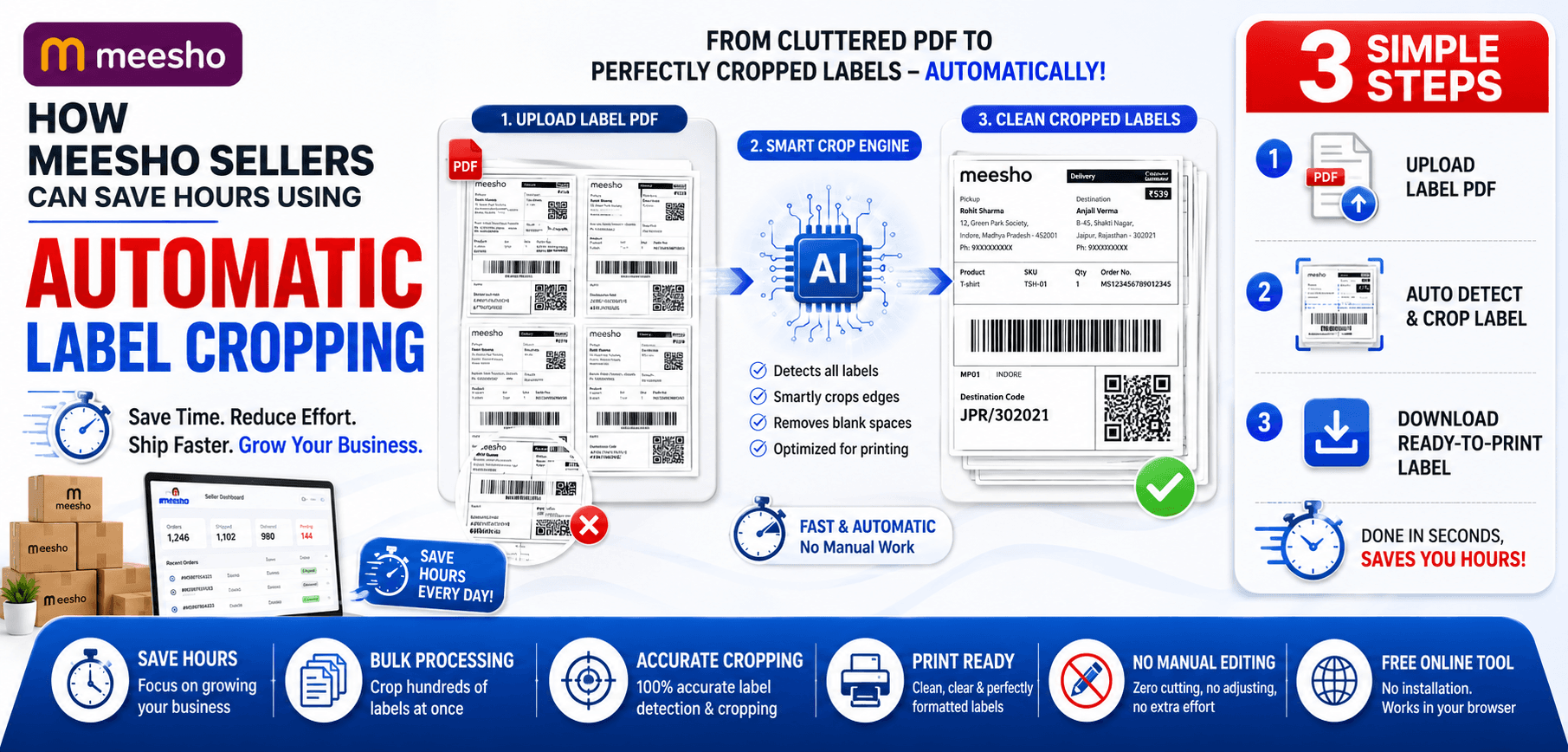
Automatic label cropping is a modern eCommerce seller tool designed to eliminate this manual workflow. By utilizing AI and smart bounding-box detection algorithms, these tools scan the PDF document, locate the exact dimensions of the shipping label and barcode, and automatically crop out the useless white margins.
The real magic lies in its batch processing capabilities. A high-volume seller can upload a single PDF containing 500 shipping labels, and the tool will detect, crop, and output a perfectly formatted 4x6 inch thermal printer file in mere seconds.
How Meesho Sellers Can Save Hours Using Automatic Label Cropping
Faster Label Preparation
What used to take hours now takes seconds. With automatic detection, the time between downloading your daily orders from the seller panel and sending them to the printer is drastically reduced.
Bulk Processing Hundreds of Orders
During festive sales like Diwali or Big Billion Days, order volumes skyrocket. Bulk label cropping ensures that your processing speed scales effortlessly with your order volume.
Reduced Manual Editing
By completely eliminating the need for Adobe Photoshop or clunky screenshot tools, your workflow becomes streamlined. The software does the heavy lifting.
Improved Printing Accuracy
Because the software crops with mathematical precision, every label is exactly the same size. This consistency guarantees perfect thermal prints every single time, without fading or cut-off barcodes.
Faster Packaging Workflow
When labels are printed clearly and consistently, your warehouse team can pack products and attach labels in a smooth, rhythmic motion.
Increased Productivity
By automating the most tedious part of your day, you free up mental bandwidth. You can refocus your energy on sourcing new products, analyzing margins, or answering customer queries.
Manual Cropping vs Automatic Label Cropping
| Feature | Manual Cropping | Automatic Label Cropping |
|---|---|---|
| Time Required | Hours (approx. 1 min per label) | Seconds (instantly for batches) |
| Accuracy | Inconsistent, prone to human error | 100% mathematically precise |
| Bulk Processing | Impossible; must do one by one | Supports hundreds of pages at once |
| Human Error Risk | High (cutting barcodes, missing details) | Zero (automated bounding boxes) |
| Productivity | Extremely low | Extremely high |
| Scalability | Requires hiring more staff as orders grow | Scales infinitely with software |
The comparison makes it clear: manual cropping is a bottleneck that prevents your business from growing, while automation enables effortless scalability.
Step-by-Step Guide to Automatic Meesho Label Cropping
Using tools like AllPDFTools simplifies this entire workflow. Here is how you do it:
Step 1: Download Shipping Labels
Go to your Meesho Seller Panel. Under pending orders, generate and download the consolidated PDF containing all your shipping labels for the day.
Step 2: Upload Labels to the Cropper Tool
Navigate to the AllPDFTools Label Cropper. Drag and drop your downloaded PDF directly into the browser window.
Step 3: Automatically Detect Label Area
Click "Auto-Detect Labels". The software will instantly scan the pages and outline the optimal crop boundaries for your shipping labels.
Step 4: Preview Cropped Output
Check the preview to ensure the barcodes and addresses are perfectly framed. You can make minor adjustments if necessary.
Step 5: Download Processed Labels
Click "Crop PDF". Within seconds, a new, perfectly sized PDF will be downloaded to your computer.
Step 6: Print and Attach Labels
Send the new file to your thermal printer. Because the size is perfect, the printer will churn out labels flawlessly. Attach them to your packages and you're done!
Benefits for High-Volume Sellers
Faster Dispatch Times
Beat the courier cutoff times every day. Faster dispatch means your products reach customers quicker.
Better Team Efficiency
Your team can focus on quality control and proper packaging rather than fighting with PDF files.
Reduced Operational Bottlenecks
No more waiting for the "computer guy" to finish cropping. The process becomes instantly accessible to anyone.
Lower Labor Costs
Automation tools cost pennies compared to a monthly salary. Save money and increase your profit margins.
Improved Customer Satisfaction
Readable barcodes mean fewer lost packages and delays in transit, resulting in happier customers and better reviews.
Common Mistakes Sellers Make
- Incorrect crop dimensions: Cropping a label to a strange aspect ratio causes the barcode to stretch, making it unreadable by scanners.
- Manual editing errors: Accidentally saving over the original file or deleting a label from the batch.
- Printing misalignment: If the PDF is not cropped tightly, the thermal printer will print over the edge of the sticker.
- Cropping the wrong section: Leaving out the SKU details that the packing team needs to verify the order contents.
- Poor label quality: Taking blurry screenshots instead of cropping the original vector PDF results in pixelated, unreadable labels.
By utilizing an automated tool, all of these common mistakes are instantly resolved.
Best Practices for Label Printing
- Verify crop previews: Always quickly scan the first few pages of the preview to ensure nothing essential is cut off.
- Use correct paper sizes: Set your printer settings exactly to the physical size of the label (usually 4x6 inches or 100x150mm).
- Check printer settings: Ensure your print density is high enough so the barcodes are jet black.
- Test print before bulk printing: Print one page first to check alignment before printing 500 labels.
- Maintain label clarity: Regularly clean your thermal printer head with an alcohol wipe.
- Organize labels by order batches: Sort your labels by product SKU before printing to speed up the warehouse packing process.
- Archive processed labels: Keep digital copies of your cropped batches for at least 30 days for reference.
Meesho Seller Workflow Optimization
To truly dominate the marketplace, optimizing your entire workflow is necessary.
Label Cropping
Automate it entirely. This is step one in a smooth fulfillment engine.
Invoice Management
Use tools to extract or split invoices if you prefer to pack them inside the boxes for better compliance.
Bulk Printing
Invest in a fast, commercial-grade thermal printer to handle the output of your freshly cropped labels.
Shipping Preparation
Pre-assemble boxes and polybags before the label batch is finished printing.
Inventory Coordination
Sync your physical packing process with your digital inventory logs to prevent stockouts.
Why eCommerce Sellers Need Automation in 2026
The eCommerce landscape in 2026 is brutally competitive. With growing order volumes, sellers can no longer rely on inefficient manual processes. Faster delivery expectations from platforms like Meesho mean you have strict cut-offs. AI-powered seller tools are no longer a luxury; they are a prerequisite for warehouse efficiency and survival in the modern marketplace.
Best Tools for Meesho Sellers
- Automatic Label Cropper: The absolute essential tool for daily operations. Try AllPDFTools for flawless results.
- PDF Label Processor: Advanced features for combining labels from multiple marketplaces.
- Bulk PDF Splitter: Useful for separating a massive PDF into individual orders.
- PDF Merger: Ideal for combining daily batches into weekly manifest archives.
- Shipping Document Organizer: Keeping your digital workspace clean and compliant.
Frequently Asked Questions (FAQs)
1. What is Meesho label cropping?
It is the process of removing the excess white space from A4-sized shipping labels provided by Meesho, making them suitable for printing on smaller thermal label printers.
2. Why should I crop shipping labels?
Cropping ensures that the barcode and customer details print clearly on a 4x6 thermal sticker. Printing an uncropped A4 PDF on a small sticker results in unreadable, tiny text.
3. Can I crop multiple labels at once?
Yes! Using an automatic label cropper like AllPDFTools, you can upload a PDF containing hundreds of labels and crop them all simultaneously.
4. How much time can automatic cropping save?
For a seller processing 100 orders a day, automatic cropping can save 1 to 2 hours of manual editing daily.
5. Is automatic label cropping accurate?
Absolutely. The software uses boundary detection algorithms to perfectly frame the label every time, eliminating human error.
6. Can I use the tool for bulk orders?
Yes, bulk label cropping is designed specifically for high-volume sellers managing hundreds or thousands of orders during peak sale events.
7. Does cropping affect barcode readability?
When done automatically, no. It improves readability because the barcode is perfectly scaled to fit the thermal printer width, unlike manual screenshots which can degrade quality.
8. What is the best Meesho label cropper tool?
AllPDFTools offers an incredibly fast, secure, and accurate automatic label cropping tool designed specifically for eCommerce sellers in 2026.
Conclusion
In the fast-paced world of eCommerce, time is money. Automatic label cropping is a simple yet profoundly effective way to save hours of manual work and improve your overall seller productivity. Whether you are a small business owner fulfilling your first 10 orders or a massive warehouse dispatching thousands of packages, embracing automation is key.
Stop struggling with manual screenshots and clunky editing software. By using reliable solutions like AllPDFTools, you can streamline your Meesho order processing, reduce errors, and focus your energy on what truly matters: growing your business.
Ready to Automate Your Labels?
Join thousands of smart Meesho sellers saving hours every day. Try the AllPDFTools Automatic Label Cropper now!