
Amazon, Flipkart, Meesho and Snapdeal Label Formats Compared
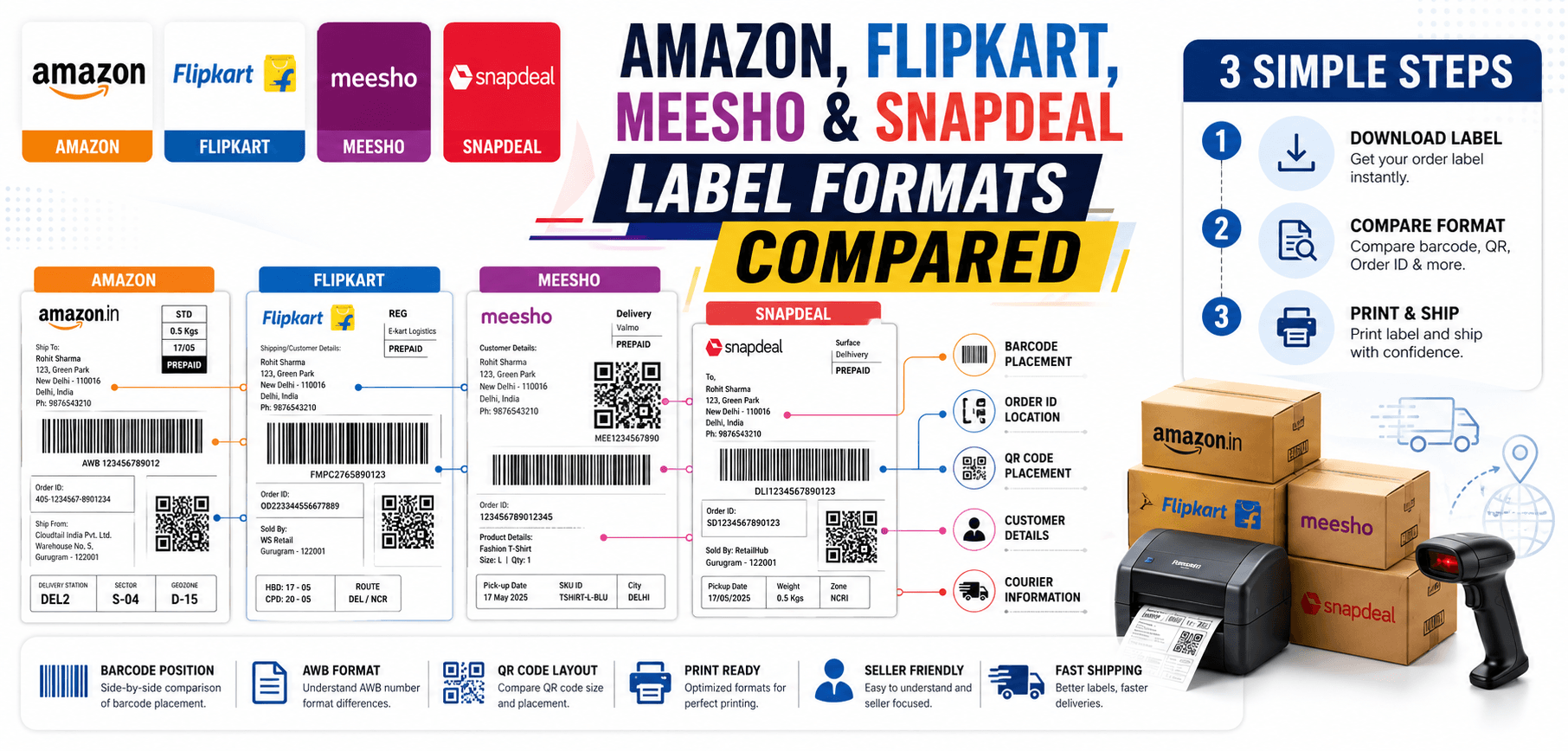
Introduction
The growth of multi-channel selling in India has empowered sellers to reach millions of buyers across various platforms. However, selling simultaneously on Amazon, Flipkart, Meesho, and Snapdeal introduces significant operational complexity—especially when it comes to order fulfillment.
One of the biggest challenges sellers face is dealing with disparate shipping documentation. Every marketplace generates its shipping labels in a unique layout and format. A process that works perfectly for Amazon might result in cut-off barcodes and dispatch delays for Flipkart.
Understanding the distinct label formats of each platform is vital. It allows warehouse teams to print documents correctly, utilize automated label cropping effectively, and ensure seamless courier handovers without frustrating rejections.
What Is a Marketplace Shipping Label?
A marketplace shipping label is an essential logistics document affixed to the exterior of a packaged order. It serves several critical functions:
- Order Identification: Links the physical box to the digital transaction.
- Courier Routing: Provides the logistics partner with exact geographic zones and sorting codes.
- Barcode Tracking: Allows the package to be scanned and tracked at every transit hub.
- Delivery Management: Provides the delivery agent with the final customer address and contact details.
Key Components Found on Most Shipping Labels
While layouts differ, almost all marketplace shipping labels include the following core components:
Order ID
The internal reference number used by the marketplace.
AWB Number
The Air Waybill tracking number used by the courier company.
Customer Address
The delivery destination, including the crucial PIN code.
Seller Information
The return address in case the delivery fails (RTO).
Courier Information
The logistics provider's logo (e.g., Delhivery, Ecom Express).
Barcode
The scannable visual representation of the AWB.
Routing Codes
Large letters or numbers that help warehouse workers toss packages into the correct geographic bins.
Amazon Label Format Overview
Amazon (especially Easy Ship and FBA) produces highly structured and standardized labels.
- Label Layout: Usually cleanly divided into a shipping section and a packing slip/invoice section on an A4 page.
- Barcode Position: Very prominent, usually placed vertically or horizontally near the center.
- FNSKU Information: For FBA sellers, Amazon requires specific FNSKU barcodes for product identification.
- Printing Requirements: Amazon demands high-contrast printing. Thermal printers are highly recommended to prevent smudging.
Flipkart Label Format Overview
Flipkart labels are designed primarily for their in-house logistics arm, Ekart.
- Shipping Label Structure: Flipkart often provides the shipping label and invoice crammed onto the same page.
- AWB Placement: Usually very clear, right below a large Ekart logo.
- Courier Routing Information: Features large, bold routing letters indicating the destination hub.
- Printing Guidelines: Sellers frequently struggle with Flipkart PDFs because the label needs to be manually cropped from the invoice to fit a 4x6 thermal label.
Meesho Label Format Overview
Meesho has rapidly grown by enabling small businesses and dropshippers.
- Label Design: Often features a dense layout. Meesho puts the shipping label at the top and the invoice summary directly beneath it.
- Barcode Visibility: Highly critical. The barcode is standard, but the text around it can sometimes crowd the scanning area if printed poorly.
- Printing Considerations: Similar to Flipkart, Meesho sellers heavily rely on automatic label croppers to separate the label from the invoice for thermal printing.
Snapdeal Label Format Overview
Snapdeal maintains a straightforward fulfillment document structure.
- Label Components: Clearly demarcated shipping details and seller addresses.
- Tracking Details: AWB is prominently displayed alongside a standard Code-128 or similar barcode.
- Dispatch Requirements: Snapdeal requires clear adherence to label dimensions, meaning 'Fit to Page' scaling errors must be avoided.
Amazon vs Flipkart vs Meesho vs Snapdeal Label Comparison
| Feature | Amazon | Flipkart | Meesho | Snapdeal |
|---|---|---|---|---|
| AWB Placement | Top/Center | Top Right (under Ekart) | Center | Top Center |
| Label Layout | Strictly structured | Label + Invoice mixed | Dense top-half label | Standardized blocks |
| Cropping Need | Low to Medium | High (for thermal) | High (for thermal) | Medium |
| Bulk Processing | Built-in options | Requires 3rd party tools | Requires 3rd party tools | Moderate support |
Common Problems Sellers Face with Different Label Formats
- Incorrect Cropping: Taking manual screenshots of a Flipkart or Meesho label often cuts off essential routing codes, causing courier rejection.
- Barcode Truncation: "Shrink to Fit" print settings warp the barcode aspect ratio, making it unreadable by laser scanners.
- Printing Misalignment: Printing an A4 layout onto a 4x6 thermal printer without formatting results in tiny, illegible text.
- Bulk Processing Challenges: Downloading 100 Meesho orders results in 100 unformatted pages that take hours to prepare manually.
Why Label Cropping Matters
Marketplaces output PDFs designed for standard A4 desktop printers. However, professional eCommerce sellers use 4x6 thermal printers because they are faster, use no ink, and create waterproof, smudge-proof stickers.
Label cropping is the process of extracting just the shipping label area from the A4 document, discarding the invoice, and resizing it perfectly for thermal printing. This guarantees barcode readability, reduces paper waste, and vastly speeds up packing operations.
Manual vs Automatic Label Cropping
| Feature | Manual Cropping (Snipping Tool) | Automatic Cropping (AllPDFTools) |
|---|---|---|
| Speed | Very Slow (1-2 mins per label) | Instant (Seconds for 100s of labels) |
| Accuracy | Prone to human error | 100% precise boundary detection |
| Bulk Processing | Impossible to scale | Effortlessly handles bulk batches |
| Productivity | Drains warehouse resources | Frees up staff for actual packing |
How AllPDFTools Helps Marketplace Sellers
AllPDFTools provides specialized, browser-based automation tools tailored for multi-channel Indian eCommerce sellers:
- Flipkart Label Cropper: Automatically detects Ekart anchor texts and crops the exact label area.
- Meesho Label Cropper: Separates dense Meesho shipping blocks from their attached invoices effortlessly.
- Amazon Label Cropper: Formats Amazon Easy Ship and FBA labels perfectly for 4x6 thermal rolls.
- Bulk PDF Processing: Upload a 500-page combined PDF, and download a fully formatted, print-ready file in seconds.
Best Printing Practices Across All Platforms
- Print at actual size: Never use "Fit to Page" in your PDF viewer.
- Maintain barcode clarity: Clean your thermal printer head regularly with rubbing alcohol.
- Verify AWB visibility: Ensure the tracking number is not clipped off the edge of the sticker.
- Use quality paper: Use matte thermal sticker paper; glossy paper reflects scanner lasers.
- Test scan labels: Randomly test a printed label with your smartphone to ensure readability.
- Organize labels by marketplace: Keep Amazon, Flipkart, and Meesho piles separate for faster courier handovers.
- Archive shipping documents: Keep a digital backup of the original PDFs for reconciliation and RTO disputes.
Multi-Channel Seller Workflow Optimization
To survive selling on multiple platforms, you must automate. Start by scheduling Bulk Label Downloads at specific times of the day. Run those files through Automated Cropping tools. Perform Batch Printing rather than printing one-by-one. Finally, organize the physical boxes by courier (Delhivery vs. Ekart) to streamline Courier Coordination. This workflow drastically improves warehouse efficiency.
Future of Marketplace Shipping Automation in 2026
Looking ahead in 2026, AI-powered label processing is becoming the norm. Automated tools will soon verify barcode integrity before you even print. Smart dispatch systems will organize your printing queues based on courier arrival times. As marketplaces demand faster SLA compliance, investing in seller productivity platforms today is the only way to scale profitably.
Frequently Asked Questions (FAQs)
1. Are Amazon and Flipkart labels the same?
No. They have completely different layouts, routing codes, and barcode placements tailored to their respective logistics networks.
2. What is an AWB number?
The Air Waybill (AWB) is the unique tracking identifier used by the courier company to monitor the package during transit.
3. Why do marketplace labels have different layouts?
Each marketplace uses different logistics partners (or in-house networks like Ekart or Amazon Transportation) which require specific data formats for their automated sorting machines.
4. Which platform has the easiest label format?
Amazon's format is generally considered the most standardized, though thermal printing FBA labels still requires specific formatting.
5. Can I process labels in bulk?
Yes. Most marketplaces allow bulk downloading of a combined PDF. You can then use AllPDFTools to bulk crop and format them.
6. Why are my labels getting cropped incorrectly?
Manual cropping using a snipping tool is inaccurate. You might be accidentally cutting off the edge of the barcode or vital routing codes.
7. What is the best label cropper for marketplace sellers?
AllPDFTools offers dedicated cropping engines specifically calibrated for Amazon, Flipkart, and Meesho label layouts.
8. How can I improve shipping efficiency across multiple marketplaces?
Standardize your hardware (use 4x6 thermal printers), batch process your orders by marketplace, and automate your PDF formatting to eliminate manual editing.
Conclusion
Navigating the different shipping label formats of Amazon, Flipkart, Meesho, and Snapdeal is a necessary hurdle for multi-channel eCommerce sellers. While each platform has its own quirks and layouts, the fundamental goal remains the same: presenting a scannable, accurate document to the courier.
Manual formatting is a massive drain on warehouse productivity. By leveraging automated PDF solutions like AllPDFTools, you can instantly crop, format, and print perfect labels for any marketplace—saving time, reducing errors, and accelerating your dispatch process.
Automate Your Multi-Channel Fulfillment
Stop struggling with different label formats. Use AllPDFTools to automatically crop and format your Amazon, Flipkart, and Meesho labels in seconds.